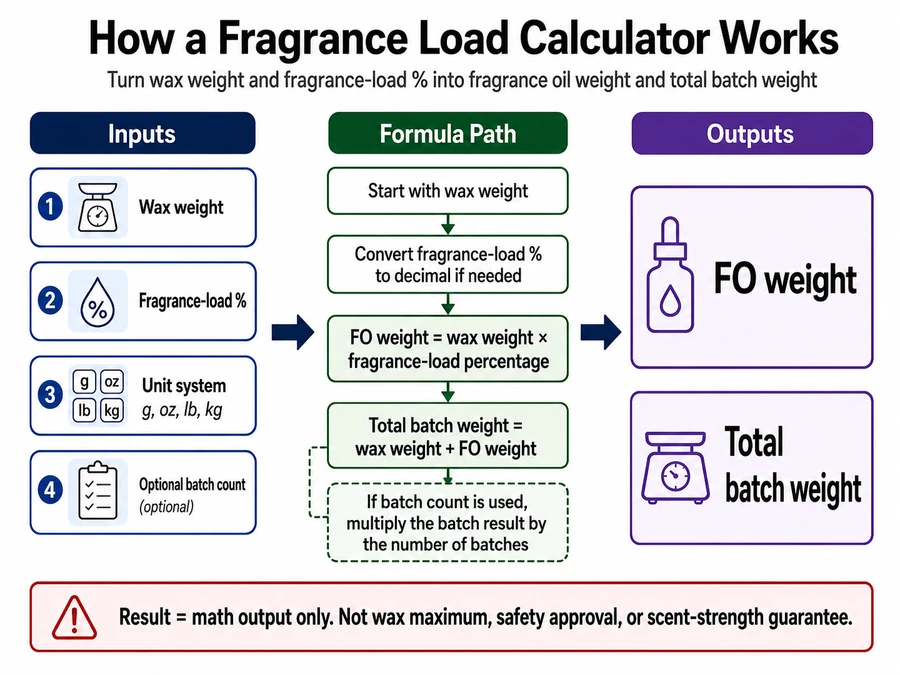
Fragrance load is the percentage of candle fragrance oil calculated against wax weight, so fragrance oil weight equals wax weight multiplied by the selected fragrance-load percentage.
Use this page when you know your wax weight and want the fragrance oil amount by weight. For candle fragrance and scenting, “load” means the calculation percentage. It does not mean scent strength, wax compatibility, safety approval, or IFRA category compliance.
This calculator page covers wax weight, fragrance oil weight, total batch weight, unit conversion, calculator errors, and batch scaling. It does not replace wax-specific limits, IFRA/SDS checks, wick sizing, cure-time guidance, scent-throw testing, or finished-candle safety checks.
Fragrance Load Calculator
Fragrance load is calculated from wax weight and fragrance-load percentage, then converted into fragrance oil weight.
Calculator input area: Enter wax weight, fragrance-load %, one weight unit, and optional batch count.
Calculator output: The calculator returns FO weight and total batch weight. The result is a math output, not a wax maximum, safety approval, or scent-strength guarantee.
Use the calculator fields in this order: wax weight first, fragrance-load percentage second, unit system third, and batch count only after the base calculation is clear.
Use this calculator as the math step in your candle fragrance and scenting process. Keep fragrance selection, wax compatibility, IFRA/SDS interpretation, wick sizing, cure time, and finished-candle testing in their own checks.
What Does Fragrance Load Mean in Candle Making?
Fragrance load is a calculation percentage, not a scent-strength score, wax-compatibility guarantee, or safety approval.
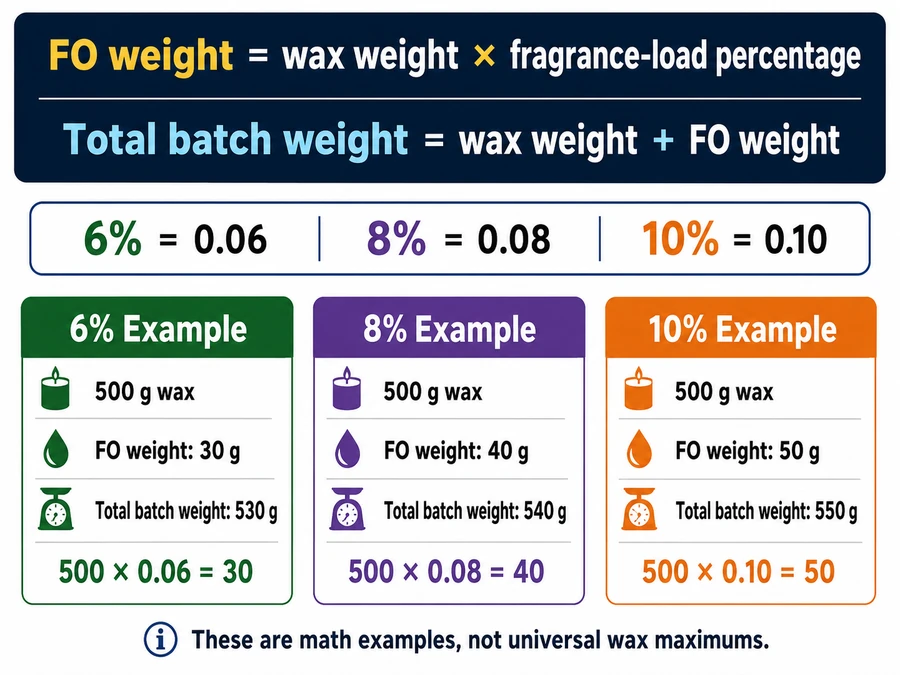
In candle making, fragrance load means the amount of candle fragrance oil calculated against wax weight. If you enter 500 g of wax and choose an 8% fragrance load, the calculator multiplies 500 g by 0.08 and returns 40 g of fragrance oil.
Term
Means Here
Does Not Mean
What to Check
Fragrance load
Fragrance oil percentage used for candle batch math
Scent strength guarantee
Use the formula below
Wax maximum
The wax maker’s stated fragrance limit
A number created by this calculator
Check wax maker documentation
IFRA/SDS limit
Fragrance-specific documentation for use and safety limits
Finished candle approval from a calculator
Check fragrance supplier documents
Weak scent
A finished-candle performance issue
Proof that the load percentage was calculated wrong
Review cure, wick, wax, and test-batch variables separately
Calculate the amount first. Then check wax documentation, fragrance documentation, and your own test result before treating that amount as usable for a finished candle.
Enter Wax Weight First: The Base Input for the Calculator
Wax weight is the base candle-wax amount the calculator uses to determine the fragrance-oil weight.
Enter the amount of wax you are starting with, not the jar size, finished candle weight, or number of candles. The calculator applies the fragrance-load percentage to that wax amount and returns the fragrance oil weight.
Input Type
What It Means
Enter It Here?
What to Do Instead
Wax weight
The wax amount before fragrance oil is added
Yes
Enter it directly
Total batch weight
Wax plus fragrance oil
No, in wax-weight mode
Use the formula section to check the finished total
Container capacity
How much a jar can hold
No
Calculate wax weight first
Candle count
Number of candles you want to make
No
Use the scaling section after wax weight is known
For example, if you have 500 g of wax, enter 500 g as the wax weight. Do not reduce the wax weight to “make room” for fragrance oil unless you are following a separate finished-batch formula.
“Batch” here means the wax amount used for this calculation, or a clearly labeled wax-plus-fragrance total later in the formula section. It does not mean container count, production run size, or inventory planning.
Read the Fragrance Oil Amount by Weight
The fragrance oil amount is the weight of candle fragrance oil needed for the wax weight and fragrance-load percentage entered.
For 500 g wax at 8%, use 40 g fragrance oil. That result means 40 g on a scale, not 40 ml, 40 drops, or 40 teaspoons.
Weight-vs-volume warning: Measure candle fragrance oil by weight because the calculator uses weight-based math. Volume units need density data, so ml, drops, and teaspoons are not reliable default outputs.
The output tells you how much FO to add to the wax amount you entered. FO means fragrance oil for candles, and the amount shown is a calculation result, not a scent-intensity score.
Set up a scale, tare your measuring container, and weigh the fragrance oil directly. If you are comparing fragrance materials, keep that choice separate from the calculator output. If the finished candle smells weak after curing, treat that as a finished-candle performance issue, not as proof that the calculator result was wrong.
These percentages are math examples, not universal wax maximums or compliance approvals. Choose a percentage for a specific wax by checking wax maker guidance, fragrance supplier documents, and test-batch results.
Manual verification checklist
Write the wax weight.
Convert the fragrance-load percentage to a decimal.
Multiply wax weight by that decimal.
Add the fragrance oil weight back to the wax weight.
Check that both numbers use the same weight unit.
Total Batch Weight = Wax + Fragrance Oil
Total batch weight is the wax weight plus the fragrance-oil weight.
Summary line: Agent: candle maker; Predicate: calculates; Patient: total batch weight; Instrument: wax weight plus FO weight; Location: formula check; Time: after fragrance-oil weight is known.
In this calculator, fragrance oil does not replace wax. It adds to the wax weight and creates the combined pour-batch weight.
Formula box Wax weight + FO weight = total batch weight
Example
Calculation
Result
500 g wax at 8%
500 g wax + 40 g FO
540 g total batch
“Batch” here means combined wax + fragrance oil pour weight. It does not mean jar fill volume, candle count, label net weight, shipping weight, or inventory batch.
If you only know jar capacity, calculate wax weight before using fragrance-load math. If you want to know how many candles a batch makes, divide the available wax by the wax weight per candle after the wax and fragrance oil weights are known.
Convert Units Before You Calculate
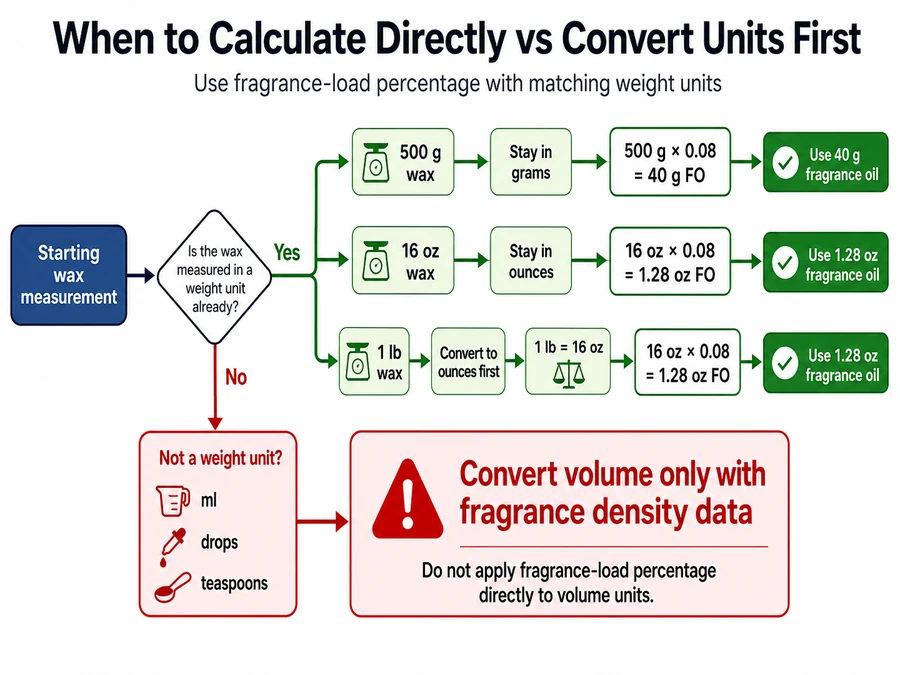
Convert wax and fragrance-oil measurements into the same weight-unit family before applying the fragrance-load percentage.
Summary line: Agent: candle maker; Predicate: converts; Patient: wax and fragrance units; Instrument: one weight-unit system; Location: measurement setup; Time: before applying the percentage.
The calculator works only when the input and output stay in compatible weight units. Do the unit conversion first, then apply the percentage.
Starting Measurement
Convert Before Calculating?
Correct Use
500 g wax
No, if output stays in grams
500 g × 0.08 = 40 g FO
16 oz wax
No, if output stays in ounces
16 oz × 0.08 = 1.28 oz FO
1 lb wax
Yes, if you want ounce output
16 oz × 0.08 = 1.28 oz FO
500 g wax + ml fragrance oil
Yes
Convert volume only if you have fragrance density data
Convert first, calculate second
Pick one weight unit: grams, ounces, or pounds.
Convert the wax weight into that unit.
Apply the fragrance-load percentage.
Keep the fragrance oil result in the same unit.
Avoid ml, drops, and teaspoons unless you have density data for that exact fragrance oil.
Use one weight-unit system throughout the calculation. For pounds and ounces, convert pounds into ounces first when you want the final fragrance oil result in ounces.
Choosing a Starting Percentage
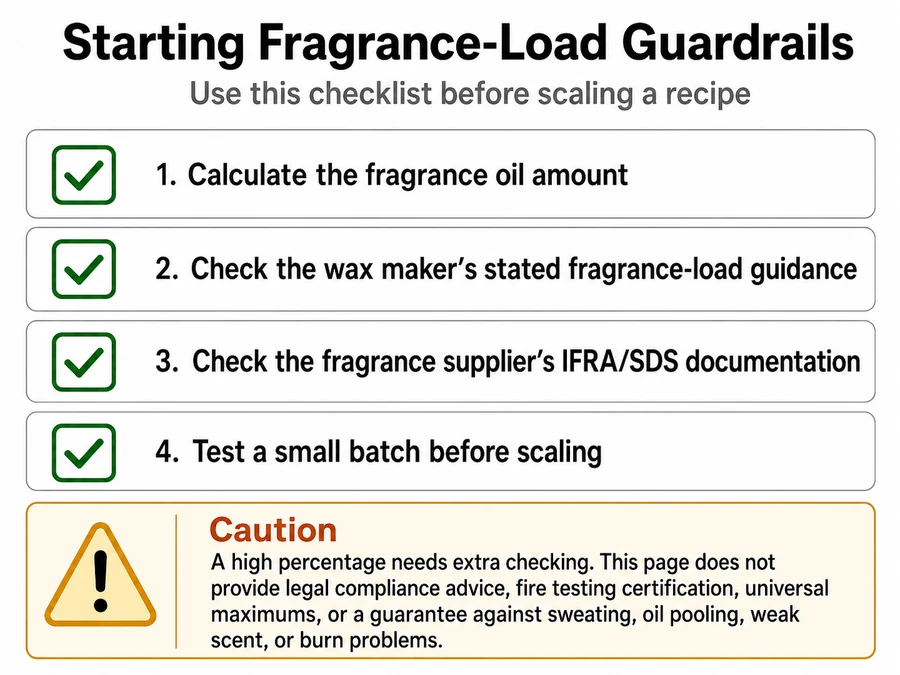
A starting percentage is a practical fragrance-load input to calculate or test, not a universal safety or compatibility limit.
Use the calculator to create the amount, then verify whether that amount belongs in your candle system. Wax type, fragrance documentation, and testing decide whether the number is usable.
Starting-percentage guardrail Calculate the fragrance oil amount. Check the wax maker’s stated fragrance-load guidance. Check the fragrance supplier’s IFRA/SDS documentation. Test a small batch before scaling.
A high percentage needs extra checking before use. This page does not provide legal compliance advice, fire testing certification, universal maximums, or a guarantee against sweating, oil pooling, weak scent, or burn problems.
Check the wax maker’s stated fragrance-load limit for the wax you are using. Check the fragrance supplier’s IFRA/SDS documents for fragrance-specific restrictions. If oil appears on the candle surface after testing, treat that as a finished-candle performance issue, not as a calculator output issue.
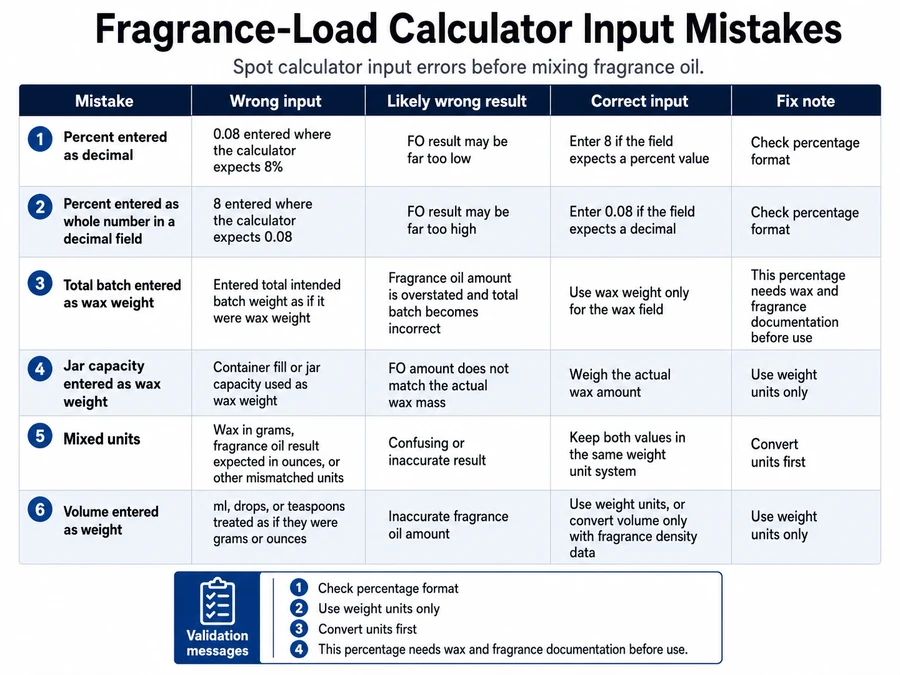
Common Fragrance Load Calculator Mistakes
Most fragrance-load calculator mistakes come from entering the wrong percentage format, using the wrong batch basis, mixing units, or measuring fragrance oil by volume.
Summary line: Agent: candle maker; Predicate: corrects; Patient: fragrance-load calculator error; Instrument: wax weight, percentage format, and weight unit; Location: calculator input; Time: before mixing fragrance oil.
An error here means a calculator input, unit, percentage, or basis mistake. It does not mean every candle defect, weak scent problem, sweating issue, wick issue, or cure-time issue.
Error Type
Wrong Input
Likely Wrong Result
Correct Input
Fix Note
Percent entered as a decimal
0.08 for 8%
0.08% load, too little FO
8
Enter the percent number if the field is labeled “%”
Percent entered as a whole number in a decimal field
8 instead of 0.08
800% load, unusable result
0.08
Match the field label before calculating
Total batch entered as wax weight
540 g instead of 500 g
FO result is too high
500 g
Use wax weight as the base input
Jar capacity entered as wax weight
8 oz jar
Result may not match wax weight
Known wax weight
Calculate wax weight first
Mixed units
500 g wax and 1.5 oz FO target
Hard-to-check output
One weight unit
Convert first, then calculate
Volume entered as weight
40 ml FO
Result depends on density
40 g FO, if that is the target weight
Use a scale unless exact density data is supplied
Correction checklist
Confirm the calculator field asks for wax weight, not finished batch weight.
Confirm the fragrance-load field expects a percentage, such as 8 for 8%.
Keep wax and fragrance oil in the same weight unit.
Do not use ml, drops, or teaspoons as default fragrance-oil outputs.
Recalculate once before scaling the batch.
Example validation messages can catch the biggest errors: “Check percentage format,” “Use weight units only,” “Convert units first,” or “This percentage needs wax and fragrance documentation before use.”
If the result seems wrong because the finished candle smells weak, treat that as a finished-candle performance issue. If fragrance oil appears on the candle surface, treat that as a wax, fragrance, temperature, or load-limit issue. If burn behavior changes, treat that as a separate candle performance issue rather than a calculator-input error.
Scale the Fragrance Load for Multiple Candles
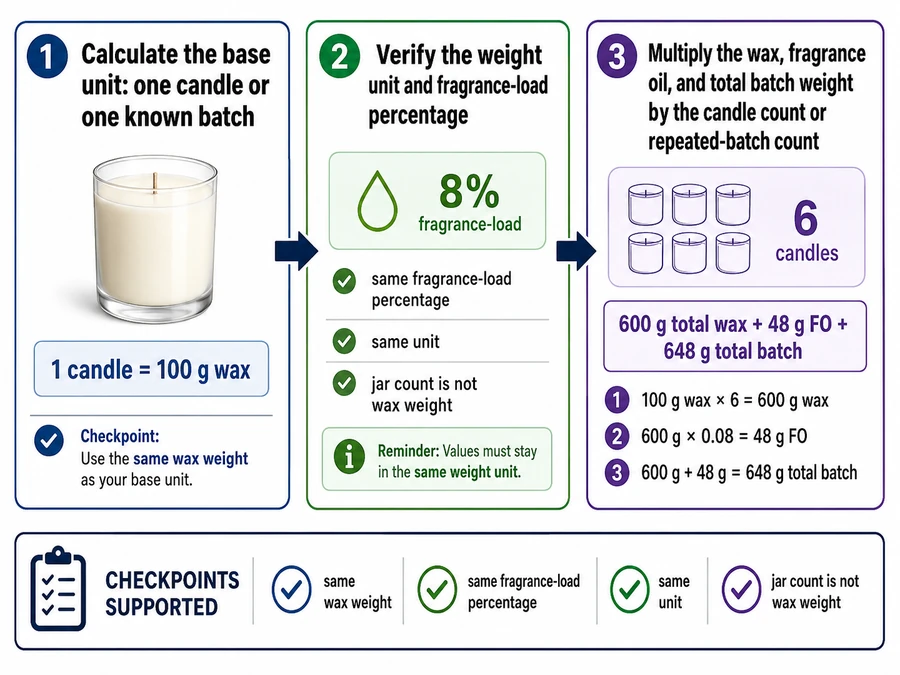
To scale fragrance load for multiple candles, calculate one candle or one batch first, then multiply the validated amounts by the number of identical candles or batches.
Summary line: Agent: candle maker; Predicate: scales; Patient: fragrance-oil amount; Instrument: base wax-and-FO calculation; Location: identical candles or repeated batches; Time: after verifying units and load percentage.
Scaling works only when the candles use the same wax weight, same fragrance-load percentage, and same unit. Jar count is not wax weight, so calculate or confirm the wax weight per candle before multiplying.
Wax Per Candle
Candle Count
Load %
Total Wax
Total FO Needed
Total Batch Weight
100 g
6
8%
600 g
48 g
648 g
150 g
4
8%
600 g
48 g
648 g
200 g
3
6%
600 g
36 g
636 g
250 g
4
10%
1,000 g
100 g
1,100 g
3-step scaling process
Calculate the base unit: one candle or one known batch.
Verify the weight unit and fragrance-load percentage.
Multiply the wax, fragrance oil, and total batch weight by the candle count or repeated-batch count.
Scaling warning: “Batch” means a repeated wax-and-fragrance calculation here. It does not mean production scheduling, inventory batch, container model, wholesale costing, or a mixed set of jars with different wax weights.
If you only know jar capacity, calculate the wax weight per candle before scaling. If you need candle count from a larger wax amount, divide the total available wax by the wax weight per candle. Scheduling, stock control, and costing are outside this fragrance-load calculation.
FAQ
Is fragrance load based on wax weight?
Yes. Fragrance load is normally calculated from wax weight, so 500 g wax at 8% uses 40 g fragrance oil.
The formula is: 500 g × 0.08 = 40 g. The total batch weight then becomes 540 g because the fragrance oil is added to the wax weight.
Should I measure fragrance oil by weight?
Yes. Measure candle fragrance oil by weight because fragrance-load math uses weight, not volume.
Use grams, ounces, or pounds consistently. Do not swap the calculator result into milliliters, drops, or teaspoons unless you have density data for that exact fragrance oil.
Can I use ml instead of grams?
Do not use ml as the default calculator input because ml measures volume, while fragrance load is calculated by weight.
If a supplier gives density data, convert volume to weight before calculating. Without density data, use a scale and keep the result in grams, ounces, or pounds.
What happens if I enter 10 instead of 0.10?
It depends on the calculator field. If the field is labeled “%,” enter 10 for 10%.
If the field expects a decimal, enter 0.10 for 10%. The wrong format can create a result that is either far too low or unusably high, so always check the field label before mixing.
Does the calculator show the safest maximum?
No. The calculator shows the math result for wax weight and fragrance-load percentage, not the safest maximum for every wax or fragrance.
Check the wax maker’s guidance, the fragrance supplier’s IFRA/SDS documents, and your test batch before scaling. The calculator gives the amount; documentation and testing decide whether that amount is usable.
How do I scale for multiple candles?
Calculate one candle or one known batch first, then multiply the wax weight, fragrance oil weight, and total batch weight by the number of identical candles.
Only scale after the unit, percentage, and wax-weight basis are confirmed. If the jars have different fill weights, calculate each size separately.
Match Bottle Size to the Calculated FO Amount
After calculating your fragrance-oil weight, choose a bottle size that covers your batch plus a small testing margin.
If the calculator returns 40 g fragrance oil for one batch and you plan to make three identical batches, you need 120 g fragrance oil before spill allowance, testing loss, or future batches. Choose a bottle size that fits the calculated amount rather than guessing from jar count.
For the next step, match the fragrance oil size to your calculated batch amount. Then check the wax type, fragrance documentation, and test result before scaling the recipe.