

Readable candle labels use contrast, type size, spacing, opacity, and finish-aware proofing so text stays legible on clear, dark, and frosted containers.
Candle labels are printed or applied product-facing labels on candle containers, not generic jar stickers or warning panels. Readable means the shopper can identify the candle name, scent, and key details after the label is printed, applied, and viewed on the finished vessel. Clear, dark, and frosted containers each change how text, color, and edges appear. The design work stays focused on visual legibility, not legal wording, waterproofing, barcode setup, or printer setup.
What Makes a Candle Label Readable on a Finished Container?
A readable candle label is one whose main text stays legible after the label is printed, applied, and viewed on the finished candle container.
Candle labels are printed or applied product-facing labels used within Labels & Packaging to show the candle name, scent, brand, and key product details. Readable means the label has enough contrast, type size, weight, spacing, hierarchy, background separation, placement, and proofing support for real viewing conditions.
A screen mockup can look readable while the finished jar does not. The vessel finish, wax color, lighting, container curve, print scale, and label stock can all change how the same text appears.
The baseline check for a readable candle label should cover these factors before the design moves into clear, dark, or frosted container decisions.
| Readability factor | What to check on the finished candle container | Common failure |
|---|---|---|
| Text contrast | Main text separates clearly from the label background, vessel, wax, and shadows. | Pale text blends into pale wax or frosted glass. |
| Font size | The product name, scent name, and small details are readable at normal shelf distance. | Small copy looks clear on screen but shrinks too much in print. |
| Font weight | Letter strokes are thick enough to hold shape after printing and application. | Thin script or hairline serif strokes disappear. |
| Letter spacing | Letters have enough space to avoid merging on curved or textured surfaces. | Tight tracking makes words blur together. |
| Background stability | Text sits on a stable label area, backing, or block when the vessel behind it changes. | Transparent labels rely on wax or room background for contrast. |
| Label placement | Key text stays inside the front readable zone of the candle container. | Important words wrap too far around the curve. |
| Proofing status | The label is checked at printed size on an actual or representative container. | The design is approved from a flat digital mockup only. |
This checklist is based on finished-container reading conditions: printed scale, surface contrast, vessel finish, and front-view legibility. It is not a legal checklist, durability test, printer approval process, or branding review.
| Readable means | Readable does not mean |
|---|---|
| Main candle label text remains visually legible after printing and application. | The label automatically satisfies candle label legal requirements. |
| Contrast, type, spacing, hierarchy, and background treatment support quick reading. | The label includes the right candle warning labels or safety wording. |
| The design works on the actual container finish, not only on a flat mockup. | The label has been tested as one of the waterproof candle labels for smearing, oil, water, or adhesion. |
| Shoppers can identify the candle name, scent, and key details without guessing. | The label is automatically premium-looking, printer-ready, or fully aligned with a complete brand system. |
Readable candle labels start with visual legibility, then finish-specific design choices decide whether that legibility holds on clear, dark, and frosted containers.
Clear vs Dark vs Frosted Containers: How Label Contrast Changes
Clear containers make the label background unstable, dark containers reduce light/dark separation, and frosted containers soften text edges.
In this article, safer or best means lower risk of visual unreadability; it does not mean legally compliant, fire-safe, waterproof, or more durable.
Clear containers create background instability, dark containers reduce light/dark separation, and frosted containers soften edges and mute contrast. A candle label that works in one finish can fail in another because the vessel changes what sits behind or around the text.
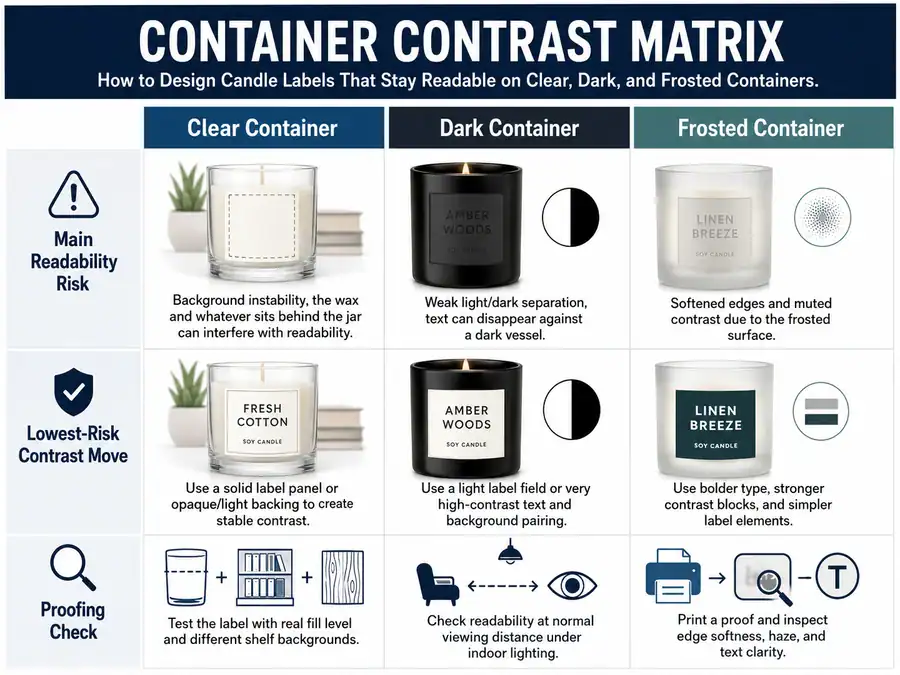
In Labels & Packaging, contrast should be judged as visible separation between the text, label background, vessel surface, wax, and shadows. Accessibility guidance commonly treats contrast as a lightness-separation problem and warns against relying only on color differences, which is useful for candle labels even though it is not a candle-label legal rule.
| Container finish | Main readability risk | Lowest readability-risk contrast move | Common mistake | Proofing check |
|---|---|---|---|---|
| Clear container | Wax color, fill level, shadows, and room background change what appears behind the label. | Add a stable background, white backing, opaque panel, or strong text block. | Transparent label text sits directly over pale wax or visual clutter. | Test on a filled clear container in normal room light and shelf light. |
| Dark container | Black, amber, brown, navy, or painted glass can hide low-value text. | Use light-value text, opaque label areas, or strong background separation. | Dark-on-dark styling looks premium but makes the scent name hard to read. | Check the label in low light and from the front viewing angle. |
| Frosted container | Diffusion softens fine strokes and reduces perceived edge clarity. | Use stronger value contrast, cleaner letterforms, and heavier type. | Thin script or pale muted colors blend into the frosted haze. | Test printed labels on the actual frosted vessel, not only a mockup. |
This comparison uses three practical scoring conditions: background stability, value separation, and edge clarity. The point is to predict whether essential candle label text remains visible after the label meets the real container surface.
One label design can work across clear, dark, and frosted containers when it uses a stable opaque background, simple hierarchy, and high light/dark separation. Separate label variants are safer when a transparent stock, dark vessel, metallic effect, or pale frosted finish changes the text background too much.
Opaque and transparent treatments are not equal across finishes. Transparent treatments depend more on the vessel and wax behind the label, while opaque treatments give text a controlled reading surface.
If the problem becomes label stock, backing, adhesive, or laminate behavior, that belongs with candle label materials. If the question becomes white ink setup, foil setup, or file preparation, that belongs with candle label printing methods. If the main question becomes mood, seasonal palette, or brand color planning, keep the readability rule first and move the broader palette work to candle branding colors.
How to Keep Candle Labels Readable on Clear Containers
Keep candle labels readable on clear containers by placing essential text on a stable backed, opaque, or high-contrast area instead of relying on the wax or background behind the glass.
On clear containers, keep candle labels readable by giving text a stable background or enough contrast against the wax and anything visible through the glass. Readable means legible over the real wax and background after the candle is filled, not just attractive on a flat screen mockup.
Clear glass does not behave like a plain white design canvas. Pale wax can make white or cream text disappear, dark wax can hide black text, and wick shadows can cut through thin lettering. Refraction from curved glass can also make small scent names or ingredient-style details harder to read near the label edge.
Use these steps before approving a label for a clear candle container.
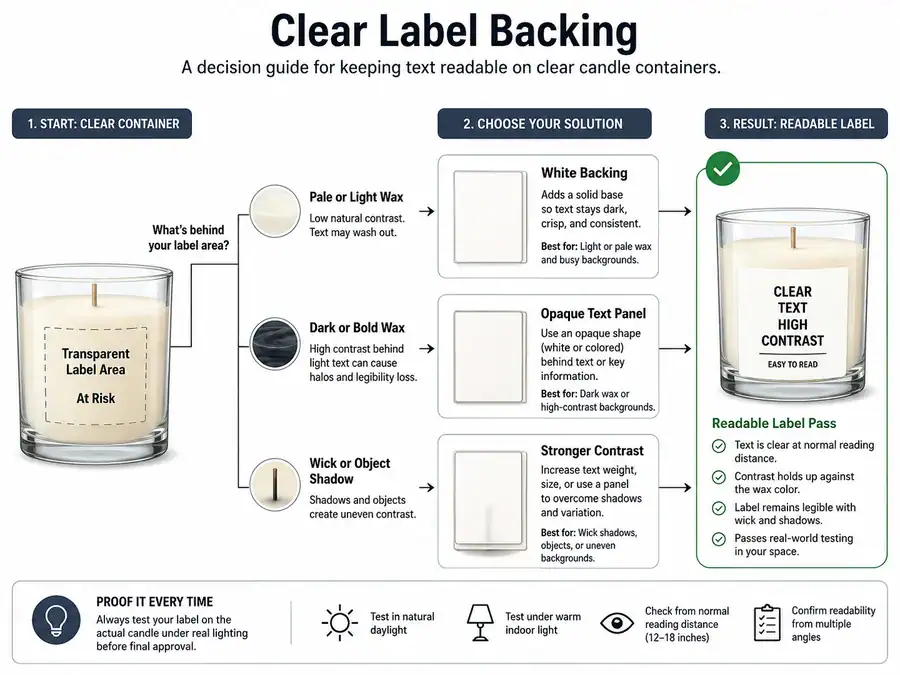
- Place the main candle name and scent name on a stable label area, not directly over unpredictable wax color.
- Choose an opaque panel, semi-opaque block, or white backing when transparent stock makes the text compete with the vessel.
- Test the label on a filled candle, because an empty clear jar does not show the same wax background.
- Check the label in front view and at a slight angle, since curved glass can distort side text.
- Review the smallest text after printing at actual size, not only in the design file.
| Clear-container situation | Readability risk | Better design choice |
|---|---|---|
| Transparent label over pale wax | Light text blends into the wax. | Add a white backing, darker text, or an opaque text panel. |
| Transparent label over dark wax | Dark text loses separation. | Use light text with enough stroke weight or add a pale backing block. |
| Clear jar with visible wick shadow | Thin letters are interrupted by shadow lines. | Move small text onto a stable background area. |
| Curved clear glass | Side text bends away from the front view. | Keep key words inside the front readable zone. |
| Clear label with decorative script | Fine strokes can disappear against mixed backgrounds. | Use a heavier typeface for the scent and product name. |
Example captions can help evaluate the same design choice without turning the decision into a full print-production topic.
| Example | What fails or works | Reader-facing fix |
|---|---|---|
| Transparent label over pale vanilla wax | The scent name has weak separation from the wax. | Add a soft opaque block behind the scent name. |
| Transparent label with white backing | The main text stays separate from the wax. | Keep the backing large enough to cover all essential text. |
| Opaque background block on clear glass | The product name stays readable even when the candle is filled. | Match the block shape to the front label area. |
Transparent candle labels can work on clear jars when the essential text has enough backing, contrast, and weight. They fail when the design depends on the wax, room background, or shelf lighting to create the missing contrast.
If the main question becomes file layers, white ink setup, or printer requirements, keep the design rule simple and move the production details to candle label printing methods. If the question becomes stock choice, backing type, adhesive, or laminate behavior, keep the readability decision here and move the detailed comparison to candle label materials.
The next readability problem is darker vessel color, where the label background may look stylish but can hide the hierarchy.
How to Keep Candle Labels Readable on Dark Containers
Keep candle labels readable on dark containers by using light-value text, opaque label areas, or backed text blocks that separate essential words from the dark vessel.
On dark candle containers, use light-value text, opaque label areas, white ink, or strong background separation so essential text does not disappear in normal lighting. High-end dark packaging is not automatically readable packaging if the scent name, weight line, or small details blend into the vessel.
Dark-container scope includes black glass, amber glass, brown glass, navy glass, dark painted vessels, and dark label backgrounds placed on dark vessels. The readability goal is visible hierarchy in normal lighting and shelf viewing, not a luxury look by default.
The safest label colors on dark candle jars usually have a clear light-value difference from the vessel or label background. White, cream, pale beige, soft gold, and light gray can work when the strokes are thick enough. Dark red, navy, charcoal, muted brown, or thin metallic type often disappears on black or amber glass.
| Treatment | Readability risk | Best readability use | Avoid when |
|---|---|---|---|
| Light text on dark vessel | Thin strokes can break up in low light. | Product name and scent name with medium or heavy weight. | The typeface is hairline, script-heavy, or very small. |
| Opaque label area | Can cover too much of the vessel style. | Small text, scent details, and brand hierarchy that must stay readable. | The goal is a fully transparent look with no visual backing. |
| White ink | Can separate text from black or amber glass. | Clear or dark stock where white needs to act as the readable layer. | The design depends on tiny white details or file setup decisions. |
| Foil or metallic text | Shine can reduce readability at an angle. | Short emphasis words, logos, or borders. | The scent name, product name, or small copy uses foil only. |
| Transparent stock on dark glass | The stock edge may vanish and dark text can disappear. | Minimal labels with strong white or light-value lettering. | The label uses dark text, muted colors, or thin lines. |
A label that disappears on black glass usually has one of three problems: the text is too close in value to the vessel, the type is too thin, or the label stock gives small text no stable reading surface. The fix is not always a brighter color. A stronger opaque panel or heavier type can improve readability without changing the whole color palette.
Use this low-light proofing checklist before approving dark-container labels.
- Hold the finished or sample container in normal room light, not only under a bright desk lamp.
- Read the candle name, scent name, and small details from the front-facing view.
- Tilt the container slightly to check whether foil, metallic ink, or gloss blocks the text.
- Compare the label against both empty and filled vessels when the glass color changes with wax behind it.
- Mark any word that needs guessing as a readability failure, even if the label looks high-end.
Short troubleshooting answers can prevent dark-container designs from drifting into a full branding or printing topic. If the label disappears on black glass, add value separation before adding more decorative effects. If white ink or foil is the main production question, use candle label printing methods for setup details. If the stock, backing, or surface fit becomes the main question, use candle label materials rather than treating every issue as a color problem.
When the main goal is market position, mood, or upscale packaging style, luxury candle branding is the better place for that strategy. For this readability decision, the dark vessel must support a clear text hierarchy before it supports a mood.
How to Keep Candle Labels Readable on Frosted Containers
Keep candle labels readable on frosted containers by using stronger value contrast, heavier type, cleaner letterforms, and stable backgrounds that resist the frosted haze.
On frosted containers, keep labels readable by using stronger value contrast, larger or heavier type, and cleaner shapes that stay sharp against a diffused surface. Frosted glass is the vessel finish; it is not the same thing as matte label laminate.
Frosted jars create a soft haze around the label area, so fine strokes, pale colors, and tiny decorative details can look weaker after printing. That is why label readability on frosted glass depends on edge clarity as much as color contrast. Readable means sharp enough to recognize through the frosted vessel’s diffused visual effect, not simply soft, muted, or elegant.
| Frosted-container example | What the reader would see | Better readability fix |
|---|---|---|
| Thin script on a frosted white jar | The scent name looks blurry or broken. | Use a heavier script only for the logo, then set the scent name in a cleaner typeface. |
| Pale beige text on frosted glass | The letters blend into the haze. | Add darker value contrast or place the text on a stable background panel. |
| Fine border lines around small text | The border loses edge clarity and distracts from the words. | Use fewer fine lines and give small text more open space. |
| Digital mockup approved without a printed sample | The mockup looks sharper than the finished jar. | Print a sample and check it on the actual frosted vessel. |
For frosted candle jar labels, the lowest readability-risk type choices usually have open letterforms, moderate or heavy stroke weight, and enough spacing between letters. Tiny all-caps text, hairline serifs, and thin script are the first areas to check because frosted glass can make them look lighter than expected.
A short frosted-container test should happen before a full print run.
- Print the label at actual size.
- Apply it to the frosted vessel, not a clear substitute.
- Read the product name, scent name, and small details from the front.
- Check the same label under softer room light and brighter shelf-style light.
- Mark any word that needs guessing as a design failure.
| Finish | Main readability problem | What changes for the label |
|---|---|---|
| Clear glass | The background behind the label changes with wax and surroundings. | Add background stability. |
| Dark glass | Low-value surfaces can hide text. | Increase light/dark separation. |
| Frosted glass | Diffusion softens text edges. | Increase edge clarity with stronger type and cleaner shapes. |
The answer to how to keep small text readable on frosted candle containers is not to shrink more information into the label. It is to reduce fine detail, increase stroke strength, and keep small text on a stable background when the frosted surface makes edges less crisp.
If the question is about frosted glass sourcing, that belongs outside the readability decision. If the issue is a label surface that looks matte, compare matte candle labels or candle label materials separately. If the problem is print setup, keep the design rule here and move production details to candle label printing methods.
The next decision is whether the label needs a controlled background behind the text.
When to Use Opaque Labels, White Backing, or Background Blocks
Use opaque labels, white backing, or background blocks when the candle container, wax color, or finish makes essential label text unstable or low-contrast.
Use opacity, white backing, or a background block when the container, wax, or finish makes the text background unstable or low-contrast. In this section, opacity means visual background separation; it does not mean waterproofing, adhesive strength, label thickness, or durability.
Candle labels need a controlled reading surface when the vessel competes with the words. Clear glass may show wax and shadows, dark containers may absorb low-value colors, and frosted glass may soften edges. The purpose is stable text separation from the vessel or wax background.
| Label treatment | Best readability use | Readability tradeoff | Test first when |
|---|---|---|---|
| Transparent label with no backing | Minimal designs where the vessel and wax do not compete with text. | Background changes can make text hard to read. | The wax is pale, dark, textured, or visually busy. |
| Transparent label with white backing | Clear or dark vessels where text needs a stable base but the label should still feel light. | Backing must be large enough to support all key text. | The label uses small scent names or pale lettering. |
| Fully opaque label | Designs that need reliable text separation across clear, dark, or frosted containers. | It covers more of the vessel. | The container finish is part of the brand look. |
| Partial background block or panel | Labels that need only the main name, scent, or details protected. | Poor placement can look patched-on. | The block is too small for the words it supports. |
Use opaque candle labels when the entire design needs a steady reading surface. Use white backing for candle labels when transparent stock is preferred but text needs help separating from the vessel. Use a partial panel when only the scent name, brand name, or small descriptive text needs protection.
| Container finish | Readability risk | Best opacity or background choice | Why it works |
|---|---|---|---|
| Clear container | Wax color, fill level, and shadows change behind the label. | White backing or a partial opaque panel. | It stops the text from relying on the wax for contrast. |
| Dark container | Dark glass hides low-value text. | Fully opaque label, pale panel, or backed light text. | It creates a lighter reading surface. |
| Frosted container | Haze softens edges and mutes small details. | Strong opaque panel or clean background block. | It sharpens the boundary around the words. |
| Decorative transparent look | The label needs vessel visibility and readable text. | Partial background block. | It protects key words without covering the whole jar. |
The answer to when to use opaque labels or background blocks for readability is simple: add them when the text would otherwise depend on the container finish, wax color, or room lighting to stay visible. The more variable the background, the more useful opacity becomes.
Background blocks work best behind the scent name, brand name, small descriptive text, and secondary details that should not be missed. A full opaque label is better when every part of the design needs the same reading surface. A partial block is better when the jar finish should remain visible and only the important text needs protection.
Mini FAQ:
| Question | Direct answer |
|---|---|
| Do candle labels need an opaque background to be readable? | Not always. They need one when the vessel or wax makes the text unstable or low-contrast. |
| When should I use white backing on candle labels? | Use it when transparent stock is desired but the text needs a pale base to stay visible. |
| How can I keep a clear label readable without covering the whole jar? | Place essential words on a partial background block or use selective backing behind the text. |
| Is opacity the same as durability? | No. Opacity affects visual separation, while durability belongs to material and use conditions. |
If the question becomes stock selection, compare candle label materials separately. If the issue is white ink setup, file layers, or production requirements, use candle label printing methods. If the problem is water, oil, rubbing, or adhesion, that belongs with waterproof candle labels, not opacity as a readability tool.
A transparent look can still stay readable when transparent candle labels use backing, panels, or strong contrast where the words need protection.
How to Set Candle Label Typography So Text Stays Legible
Set candle label typography for readability by giving the product name, scent name, and key details enough size, weight, spacing, and hierarchy at printed scale.
Candle label typography stays legible when the most important text uses enough size, weight, spacing, and hierarchy for the printed label and container shape. A readable font is not just an attractive font; it must hold its shape after printing, application, curvature, and real shelf viewing.
Use candle label font size as one part of the readability decision, not the whole decision. Small text can work when it has enough weight, spacing, and contrast, while large text can still fail if it uses a thin script on frosted glass or dark-on-dark packaging.
| Label element | Readability role | Typography check | Common failure |
|---|---|---|---|
| Brand name | Identifies the maker quickly. | Make it clear without overpowering the scent name. | Decorative lettering steals space from more useful product text. |
| Candle name | Carries the main product identity. | Give it the strongest size, weight, or placement. | The name is styled for mood but hard to read at printed size. |
| Scent name | Helps shoppers choose the candle. | Use simple letter shapes and enough stroke weight. | Thin script makes the scent hard to recognize. |
| Fragrance notes or descriptor | Adds detail after the main scent is understood. | Keep line length short enough for the container curve. | Long phrases wrap around the jar and leave the front view. |
| Net weight or secondary details | Supports product information without crowding the label. | Keep spacing open and contrast high. | Small copy becomes dense and gray after printing. |
| Optional story copy | Adds brand feel only after key text is readable. | Use it only when the main hierarchy still has breathing room. | Decorative copy crowds the scent name or pushes key text sideways. |
Table basis: the checks above rank each text element by its job on the finished candle label, then test whether size, weight, spacing, and placement support quick reading. The goal is visible hierarchy on a real container, not a full typography system.
The safest order is product name or candle name first, scent name second, then fragrance notes and secondary details. If the label is small, do not give every line the same size and weight. Equal styling makes the reader work harder because nothing tells the eye where to start.
Readable fonts for candle labels usually have open letterforms, clear spacing, and enough stroke weight to survive print scale. Script fonts can work for a logo, short brand mark, or accent, but they are risky for scent names and small details. A simple serif or sans serif is often easier to read when the container is curved, dark, frosted, or viewed in lower light.
| Font choice | Works well for | Readability risk | Better use |
|---|---|---|---|
| Thin script | Logo or short accent word. | Scent names become hard to recognize. | Use for brand accent, not essential product text. |
| Heavy script | Short names with enough spacing. | Loops and swashes can crowd the label. | Pair with simpler text for scent and details. |
| Simple serif | Product names, scent names, secondary details. | Very fine serifs can break down at small sizes. | Choose a version with enough stroke strength. |
| Simple sans serif | Scent names, small text, clean hierarchy. | Too-light weights can look faint after printing. | Use regular or medium weight for small copy. |
| All-caps text | Short headings or label lines. | Long all-caps phrases slow recognition. | Add spacing and keep phrases short. |
The phrase how to set candle label typography so text stays legible on jars means testing text at printed scale on the vessel, not judging a font inside a design file. Curved glass can hide side text, frosted glass can soften fine strokes, and dark containers can make thin letters look weaker.
Mini FAQ:
| Question | Direct answer |
|---|---|
| What font size should candle labels use? | Use the smallest amount of text that remains readable at printed size on the actual container. Size must be judged with weight, spacing, contrast, and label placement. |
| Why is my candle label font too small after printing? | It was likely approved on a zoomed-in mockup, set too light, spaced too tightly, or placed where the container curve reduces front-view reading. |
| Are script fonts readable on candle labels? | They can be readable for short accents, but they are risky for scent names, small copy, and frosted or dark containers. |
| Should every label line use the same font style? | No. A readable hierarchy needs contrast between the main product text, scent text, and secondary details. |
This typography section covers visual readability for the main product label within Labels & Packaging. Required text content, regulated type-size rules, and warning wording belong with candle label legal requirements and candle warning labels, not with visual font decisions. Layout starters can help when they preserve hierarchy, so candle label templates should be judged by whether the main text stays readable after printing. If the question becomes a full brand typography system or premium market positioning, luxury candle branding is the better place for that decision.
The next readability lever is color value, because even well-set type can disappear when the text and background are too close in lightness.
How to Choose Label Colors by Value Contrast, Not Just Hue
Readable candle label colors depend on value separation between text, label background, and the container surface.
Choose candle label colors by checking light and dark separation between the text, label background, vessel, and wax, not only whether the hues look good together. Color contrast is not hue contrast alone, and it is not a full brand palette strategy.
Value separation means how light or dark two colors appear compared with each other. Two colors can be different hues but still close in value, such as muted sage text on pale beige or dark burgundy text on brown glass. Those pairings may feel coordinated, but they can still fail as candle label color contrast after printing.
| Container finish | Risky color pattern | Safer adjustment | Proofing check |
|---|---|---|---|
| Clear container | Pale text over pale wax or cream-toned wax. | Add a darker text value, white backing, or a defined background block. | Test on a filled candle, not an empty jar. |
| Clear container | Dark text over dark wax or shadowed glass. | Use lighter text on a stable pale panel. | Check the label with wax, wick, and normal room shadows visible. |
| Dark container | Charcoal, navy, burgundy, or brown text near the vessel value. | Move to a lighter value or place text on an opaque label area. | Read the scent name in lower light. |
| Dark container | Metallic text used for all key details. | Reserve metallic color for accents and keep essential text in a readable value. | Tilt the jar to see whether shine hides the words. |
| Frosted container | Muted pastel text on frosted glass. | Increase value separation and use cleaner text shapes. | Check whether fine edges soften into the frosted haze. |
| Frosted container | Low-contrast monochrome palette. | Keep the hue family but separate lightness more clearly. | Read small details from the front at printed size. |
Table basis: each finish is judged by value separation, printed contrast, and finish impact. The table uses qualitative risk because the visible result depends on the finished vessel, wax color, label stock, lighting, and print behavior.
Readable candle label colors have enough perceptual separation on the finished vessel. They do not need to be loud, bright, or off-brand. A soft palette can stay readable when the main text sits on a stable background and the light/dark difference is clear.
| Brand color goal | Readability risk | Better adjustment |
|---|---|---|
| Keep a muted neutral palette. | Text and background may land too close in value. | Use the muted color as an accent and give main text stronger value separation. |
| Keep a dark, moody palette. | Dark text and dark vessels can collapse together. | Add a pale label area, light text, or backed text block. |
| Keep a pale minimalist palette. | Pale text can disappear on clear or frosted containers. | Use darker text for the scent name and product name. |
| Keep seasonal colors. | Seasonal hues may not match the vessel finish. | Keep the hue family but shift one color lighter or darker. |
| Keep one brand color across all vessels. | The same color may read differently on clear, dark, and frosted containers. | Create finish-aware versions that protect the same visual identity. |
The answer to how to choose label colors by value contrast for clear dark and frosted jars is to test the color pair on the actual finish before approving the palette. Clear jars need background stability, dark jars need stronger light/dark separation, and frosted jars need colors that do not soften into haze.
Mini FAQ:
| Question | Direct answer |
|---|---|
| What colors make candle labels readable? | Colors with clear light/dark separation from the label background, wax, and vessel are the most readable. |
| Why do candle label colors look readable on screen but not printed? | Screens add brightness and scale that the printed label may not have, and the container finish can change the perceived background. |
| Can I keep my brand colors and still improve readability? | Yes. Keep brand colors in accents, adjust value separation for main text, or add a background block behind essential words. |
| What should I fix first when muted colors disappear? | Increase value separation before changing the whole palette. A darker text value or lighter panel may solve the problem. |
If the question becomes mood, seasonal palettes, or full color identity, move that decision to candle branding colors. If the issue is print shift, ink behavior, or file setup, keep the readability rule here and use candle label printing methods for production details. If a ready-made layout is needed, judge candle label templates by whether their colors keep the product name and scent name readable on the chosen finish.
Good color choices still need correct placement, because even readable text can fail when it wraps too far around the container.
How to Place and Size Candle Labels for the Front Readable Zone
Place and size candle labels so the candle name, scent name, and key details stay inside the front readable zone when the container faces the shopper.
The front readable zone is the area a shopper can read when the candle faces forward. It is not the whole wraparound surface. Curved and tapered containers can push side text out of view, bend alignment, or make small words harder to read.
Place the most important candle label text inside the front readable zone of the container, using a label size and shape that do not force key details around the curve. Readable placement means visible from the front at realistic viewing distance, not perfectly readable from every angle.
Candle label size affects readability because it controls how much text fits on the front before it drifts toward the sides. A large label can look generous on a flat mockup but hide the scent name around the jar curve. A small label can keep everything front-facing but crowd the hierarchy until the product name, scent name, and secondary details compete.
Use this placement order before approving the design:
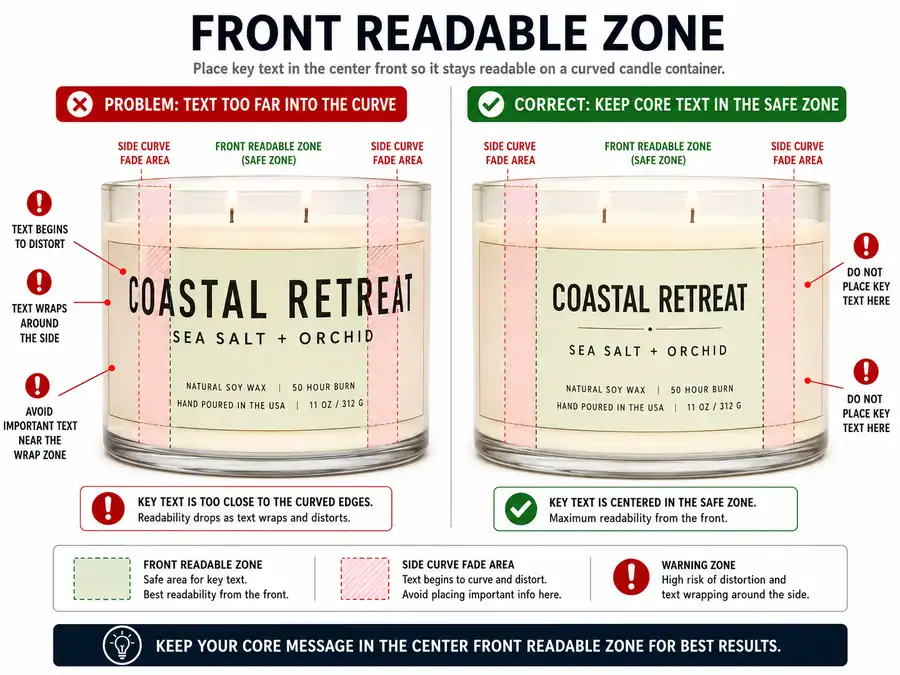
- Measure the container width, height, curve, and any taper.
- Mark the front readable zone while the candle faces forward.
- Place the candle name and scent name inside that zone first.
- Keep small text away from strong curves, low edges, and far side areas.
- Print at actual size and check the label on the real or representative vessel.
| Placement issue | Why it hurts readability | Better choice |
|---|---|---|
| Scent name wraps around the side | The shopper must turn the jar to identify the candle. | Keep the scent name centered in the front readable zone. |
| Label is too wide for a curved jar | Key words move out of the front view. | Reduce label width or move essential text inward. |
| Label is too small | Text hierarchy gets crowded. | Shorten secondary copy or increase label height where the vessel allows. |
| Text sits too low on a tapered container | The curve can make lines look crooked or compressed. | Move key text to a flatter, more stable area. |
| Wraparound label treats every side equally | Front-view reading has no clear priority. | Use the front panel for essential text and side areas for less urgent details. |
The practical answer to where to place candle label text is front-first: brand mark, candle name, scent name, and key details should sit where the container faces the reader. Side areas can hold supporting copy, but they should not carry the words that make the candle identifiable.
Candle Label Readability Check
| Check input | Pass condition | Risk warning |
|---|---|---|
| Container shape | Straight or gently curved front area supports the label. | Strong curve or taper may distort side text. |
| Label width | Essential words remain inside the front readable zone. | Main words reach the far left or right edge. |
| Label height | Small text has enough breathing room. | Lines crowd together or sit on a curved base area. |
| Main text width | Product and scent names fit without wrapping out of view. | Key text wraps around the jar side. |
| Printed sample | The label reads on the actual or representative container. | The design was judged only on a flat screen mockup. |
This check uses modeled design logic: wider labels on smaller curved vessels reduce the useful front-facing reading area. It does not replace exact template dimensions, barcode rules, legal placement rules, or production proofing.
Mini FAQ:
| Question | Direct answer |
|---|---|
| What label size is easiest to read on candle containers? | The easiest size keeps essential words inside the front readable zone without crowding the hierarchy. |
| Why is a wraparound candle label hard to read? | It can push important text around the curve, so the reader sees only part of the message from the front. |
| How do I keep side text readable on a curved container? | Keep side text secondary, increase spacing, and avoid placing the scent name or main product line near the edge. |
| What does how to place and size candle labels for front readability mean? | It means judging size and placement by front-view legibility, not by flat artwork alone. |
Exact dimensions belong in a candle label sizing guide or candle label templates. Required label placement belongs with candle label legal requirements. The placement decision here stays inside Labels & Packaging and focuses on whether the finished candle label can be read from the front before moving into candle label printing methods.
White Ink, Foil, and Metallic Effects: When They Help or Hurt Readability
Specialty effects help candle label readability only when they improve text separation, stroke clarity, or emphasis.
White ink, foil, and metallic finishes do not automatically make a candle label easier to read. They can support readability on clear, dark, or frosted containers, but they can also create glare, weak strokes, and angle-dependent text.
Specialty print effects on candle labels are readability aids or decorative finishes used on the label surface. Readable means recognizable under normal viewing angles and lighting, not premium-looking, reflective, or visually expensive.
White ink candle labels can improve separation when light text needs to show on clear or dark containers. White ink still needs enough stroke weight and backing support; thin white lettering can disappear just like thin black lettering.
| Effect | Best readability use | Risk | Avoid for | Proofing check |
|---|---|---|---|---|
| White ink | Light text or backing support on clear and dark vessels. | Thin strokes may look weak without enough weight. | Tiny copy, thin script, or unsupported pale details. | Check whether the text reads over the actual wax or dark vessel. |
| Foil | Short brand mark, border, or accent word. | Shine can hide words at an angle. | Scent names, net weight, long lines, or small details. | Tilt the jar under shelf-style light and check every key word. |
| Metallic ink | Limited emphasis when contrast stays strong. | Reflective areas can reduce edge clarity. | Full paragraphs, low-contrast dark metallic text, or fine strokes. | View straight-on and from a slight angle. |
| Opaque block instead of effect | Small text that needs a stable surface. | It may cover more of the vessel design. | Labels that require a fully transparent look. | Check whether readability improves more than the effect alone. |
| White backing plus simple type | Clear or frosted containers where wax or haze interferes. | Backing must cover the full text area. | Partial backing that ends inside the word area. | Confirm all essential words sit on the backed zone. |
Foil candle label readability depends on angle, lighting, and how much text uses foil. Foil can make a short logo or border stand out, but it is risky for scent names and small copy because reflection changes as the candle moves. Metallic ink has the same issue when the shine becomes stronger than the word shape.
Failure log:
| Failure | Likely cause | Readability fix |
|---|---|---|
| Foil used for all small text | Reflection hides fine details at an angle. | Reserve foil for a logo, short accent, or border. |
| White ink does not show enough | Strokes are too thin or the background still competes. | Increase stroke weight or add backing behind key text. |
| Metallic text disappears on dark glass | Low value separation plus reflective glare. | Use lighter non-metallic text for essential words. |
| Premium effect distracts from scent name | Decoration has more visual weight than product information. | Make the scent name plain, larger, or more stable. |
| Clear label relies on white ink alone | Wax, shadows, or background still interfere. | Add white backing or an opaque text area. |
Mini FAQ:
| Question | Direct answer |
|---|---|
| Does white ink make candle labels easier to read? | It can, but only when it creates real separation and has enough stroke weight. |
| Are foil candle labels readable on dark jars? | They can be readable for short accents, but foil is risky for small text and scent names. |
| When should candle labels use white ink instead of a background block? | Use white ink when it separates short text cleanly; use a background block when small or essential text needs a stable surface. |
| Why is my foil candle label hard to read? | The foil may be reflecting light, using strokes that are too thin, or carrying too much essential text. |
| What decides when white ink foil and metallic effects help or hurt candle label readability? | They help when they improve recognition and hurt when glare, weak contrast, or thin strokes make words harder to identify. |
For production setup, file layers, foil specifications, or printer requirements, use candle label printing methods. For stock, backing, or surface choice, use candle label materials. For premium positioning, move the strategy to luxury candle branding; in Labels & Packaging, the effect must support readable emphasis before it supports style.
How to Test Candle Label Readability Before Printing
Test candle label readability before printing by checking an actual-size printed label on the intended container finish, with realistic wax/background conditions and lighting.
Test the label at actual size on the intended clear, dark, or frosted container, under realistic lighting, with the expected wax or background condition. This checks whether contrast, type, opacity, placement, and finish-specific choices survive real viewing conditions.
A candle label proof is useful only when it shows the label close to the way the customer will see it. A zoomed-in digital mockup can confirm layout direction, but it cannot prove how the label reads on curved glass, frosted haze, dark vessels, wax color, or shelf lighting.
Use this workflow for how to test candle label readability before printing.
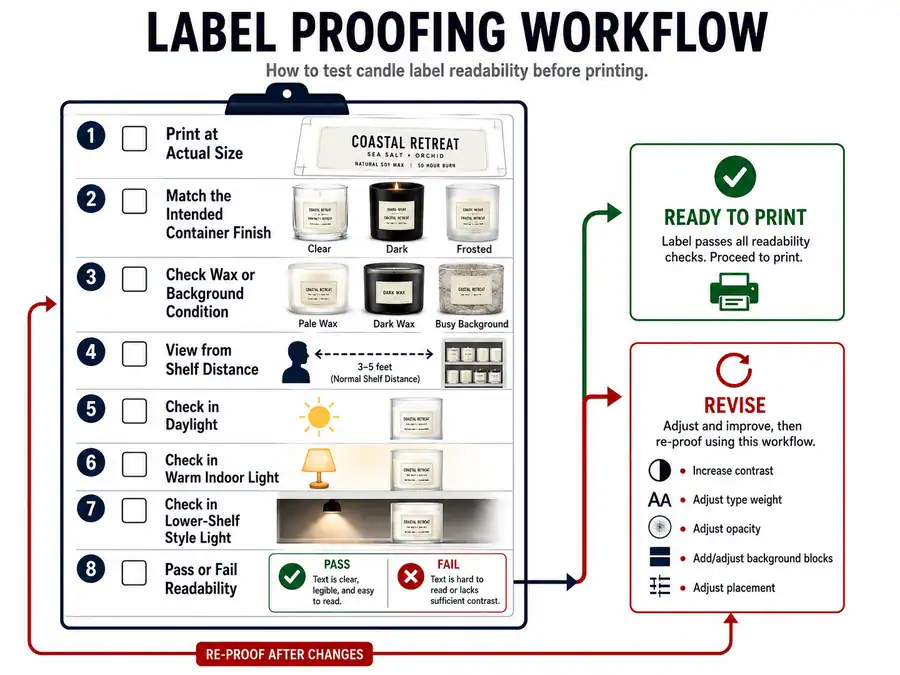
- Print or order one sample at actual size.
- Apply it to the actual container or a close vessel match.
- Fill or mock the expected wax color behind clear containers.
- View the label from normal shelf distance.
- Check it under daylight, warm indoor light, and lower shelf-style light.
- Confirm the brand name, candle name, scent name, and key secondary text are readable.
- Compare the result against the finish risk: clear background changes, dark value loss, or frosted edge softness.
- Revise contrast, type weight, opacity, background blocks, or placement before bulk printing.
| Proofing check | Pass condition | Failure sign | First fix |
|---|---|---|---|
| Actual size | The label reads without zooming or guessing. | Small text looks weaker than it did on screen. | Increase type size, weight, spacing, or simplify copy. |
| Actual container finish | Text stays readable on clear, dark, or frosted glass. | The same design reads differently on the vessel. | Adjust contrast, backing, opacity, or text color by finish. |
| Filled-container condition | Clear jars show the expected wax color behind the label. | Pale wax, dark wax, wick shadows, or reflections reduce contrast. | Add white backing, a background block, or stronger value separation. |
| Front viewing distance | Key words are readable when the candle faces forward. | Scent name or details wrap too far around the curve. | Move essential text inside the front readable zone. |
| Lighting variation | Words stay readable in daylight and softer indoor light. | Dark vessels, foil, or frosted glass hide text in lower light. | Use stronger contrast or reduce reflective effects. |
This proofing checklist belongs inside Labels & Packaging because it validates whether the visual label design works before production. It does not replace candle label printing methods, vendor proof policies, printer calibration, or full print-quality review. It also does not test waterproof candle labels, adhesive durability, rubbing, oil exposure, or burn safety.
Failure log:
| Failure | Why it happens | What to change before printing |
|---|---|---|
| Digital mockup approved without printed proof | Screen scale and brightness make text look clearer than print. | Print one actual-size proof and read it on the vessel. |
| Empty clear jar used for testing | The wax color and wick shadow are missing from the background. | Test with the expected filled-container look. |
| Label checked under one bright light | Low light can hide dark vessels, metallic effects, and small text. | Check daylight, warm indoor light, and lower shelf-style light. |
| Proof checked flat | Curvature and front-view limits are not tested. | Apply the label to the container before approval. |
| Template accepted without vessel review | A template may not match the finish, curve, or wax color. | Judge candle label templates only after printed-size container testing. |
| Stock concern mistaken for readability proofing | Material behavior may be a separate issue. | Use candle label materials when the main concern is stock, backing, or surface choice. |
Mini FAQ:
| Question | Direct answer |
|---|---|
| What should I check before printing candle labels? | Check actual size, vessel finish, wax/background condition, lighting, front-view placement, and whether key text reads without guessing. |
| Is a digital mockup enough for candle label readability? | No. A digital mockup helps review layout, but a printed proof on the container catches scale, curve, contrast, and lighting problems. |
| Should I test clear, dark, and frosted jars separately? | Yes, because each finish changes readability in a different way. Clear changes the background, dark reduces value separation, and frosted softens edges. |
| Is proofing the same as legal review? | No. Required wording belongs with candle label legal requirements and candle warning labels, not visual readability testing. |
If the label fails because the file, ink, or production setup is wrong, move that issue to candle label printing methods. If the problem is waterproofing, rubbing, oil exposure, or adhesion, move it to waterproof candle labels. If the problem is required wording or warning content, move it to candle label legal requirements or candle warning labels.
Common Candle Label Readability Mistakes and Fast Fixes
Common candle label readability mistakes include weak contrast, thin or tiny type, unstable backgrounds, poor front placement, overused effects, and no printed-container proof.
Most candle label readability mistakes happen when text lacks contrast, uses type that is too small or thin, sits outside the front readable zone, or is approved without testing on the finished container. Fix readability first through contrast, typography, opacity, placement, specialty effects, and proofing before changing unrelated branding or production details.
This section narrows the design review to printed and applied candle labels on clear, dark, and frosted containers. It is for candle makers reviewing a label before production, not for compliance audits, barcode files, waterproof testing, adhesive testing, or vendor troubleshooting.
| Mistake | Container finish most affected | Root cause | Fast fix | Bridge if deeper |
|---|---|---|---|---|
| Transparent label over pale wax | Clear containers | The text background is too light and unstable. | Add darker text, white backing, or an opaque block behind key words. | Use candle label materials if the stock or backing choice is the main question. |
| Dark text on a dark vessel | Dark containers | Text and vessel are too close in value. | Switch to lighter text, add a pale panel, or use an opaque label area. | Use candle label printing methods if the fix depends on ink setup. |
| Thin script on frosted glass | Frosted containers | Frosted haze softens fine strokes. | Keep script for accents and use heavier, cleaner type for the scent name. | Use a typography review before changing the whole brand style. |
| Foil used for small text | Dark or frosted containers | Reflection and viewing angle hide fine details. | Reserve foil for short accents, borders, or logos. | Use candle label printing methods for foil setup questions. |
| Text placed outside the front readable zone | Curved containers | Key words wrap around the side. | Move the candle name and scent name into the front view. | Use sizing and template help when the container shape drives the issue. |
| Digital mockup approved without printed proof | All finishes | The design was judged before real scale, lighting, and vessel finish were tested. | Print an actual-size proof and apply it to the intended container. | Use candle label templates only after proofing them on the vessel. |
The fastest way to fix an unreadable candle label is to correct the problem in this order: contrast first, typography second, background or opacity third, placement fourth, specialty effects fifth, then proof again. Contrast comes first because readable text needs separation before decorative choices matter. Typography comes next because thin, tight, or tiny text can fail even when the colors are acceptable.
Finish-specific failure log:
| Finish or issue | What makes a candle label hard to read | First correction |
|---|---|---|
| Clear jar | Wax color, shadows, or room background competes with transparent label text. | Add backing, a background block, or stronger text value. |
| Dark jar | Dark-on-dark styling hides the scent name or secondary details. | Increase light/dark separation. |
| Frosted jar | Soft haze makes small or thin text look weaker. | Use heavier type, cleaner shapes, and stronger value contrast. |
| Typography | Script, tight spacing, or all-small copy slows recognition. | Give essential text larger size, more weight, and more spacing. |
| Specialty effects | Foil, metallic ink, or thin white ink changes visibility by angle. | Keep effects on accents and make essential text simpler. |
| Proofing | The label was approved flat, empty, or screen-only. | Test printed size on the finished or representative container. |
Mini FAQ:
| Question | Direct answer |
|---|---|
| What are common candle label design mistakes that hurt readability? | Low contrast, tiny text, thin script, weak backing, poor placement, overused foil, and no printed proof are the usual readability failures. |
| Should I redesign the whole label if it is hard to read? | Not first. Fix contrast, type weight, opacity, and placement before changing the full brand direction. |
| Why does my candle label look messy after printing? | The design may have too much small text, weak hierarchy, tight spacing, or decorative effects that looked cleaner on screen. |
| Are missing warnings part of readability mistakes? | No. Missing warnings belong with candle warning labels, not this visual readability fix list. |
Not covered here: legal labeling mistakes, missing warning text, barcode setup, printer defects, waterproof failure, adhesive failure, oil resistance, or burn safety. Use candle label legal requirements for required label content, candle warning labels for warning wording, waterproof candle labels for durability, candle label materials for stock behavior, and candle label printing methods for print setup.
Final Readability Checklist Before You Print Candle Labels
Before printing candle labels, check the container finish, contrast, hierarchy, front readable zone, actual-size proof, lighting, and any separate legal, durability, or production questions.
Use this final check inside Labels & Packaging when the candle label design is ready for print review, not when the project still needs legal wording, material testing, or print setup decisions.
| Pre-print check | Pass condition | Fix before printing if |
|---|---|---|
| Container finish | The design has been checked on the intended clear, dark, or frosted container. | The label was judged only on a flat mockup. |
| Text contrast | The product name, scent name, and key details separate clearly from the vessel, wax, and label background. | Text blends into pale wax, dark glass, frosted haze, or shadows. |
| Typography hierarchy | The reader can identify the candle name and scent before secondary details. | Decorative type, tiny text, or equal styling makes every line compete. |
| Background support | Opaque areas, white backing, or blocks support text where the vessel creates contrast problems. | Transparent areas depend on wax color or lighting to stay readable. |
| Front readable zone | Key words sit inside the front-facing area of the container. | The scent name or main detail wraps around the side. |
| Color value | Main text has enough light/dark separation, not just a matching hue. | Brand colors look coordinated but too close in value. |
| Specialty effects | White ink, foil, or metallic accents support recognition instead of carrying hard-to-read details. | Glare, thin strokes, or viewing angle hide essential words. |
| Actual-size proof | A printed sample has been checked on the real or representative vessel. | The design has only been viewed zoomed in on screen. |
| Lighting check | The label stays readable in daylight, warm indoor light, and lower shelf-style light. | Dark vessels, metallic effects, or frosted glass reduce readability in softer light. |
| Template fit | candle label templates preserve the front readable zone and text hierarchy on the chosen vessel. | The layout fits the file but not the finished candle container. |
| Required wording | candle label legal requirements and candle warning labels are handled separately from visual readability. | The review is trying to solve legal or warning text through design advice. |
| Durability and materials | waterproof candle labels and candle label materials are handled separately when smearing, oil, water, adhesion, or stock behavior is the real concern. | The problem is rubbing, peeling, moisture, laminate, adhesive, or surface compatibility. |
| Production setup | candle label printing methods are handled separately when the issue is file layers, white ink setup, foil setup, printer proof policy, or production requirements. | The design is readable, but the print process still needs technical setup. |